
 ronwidha
Running svnserve as a windows service: long filename problem
I was following this blog post to run subversion on my laptop. It basically suggest running this command to register svnserve as windows service:
C:\>sc create svn_repos binpath= "C:\DevSupport\Subversion\bin\svnserve.exe --service --root D:\Repository" displayname= "Subversion Repository" depend= Tcpip
The issue is, how does one put in long directory name like 'Program Files' or 'Subversion Repository'?
I have found a work around, which is to use environment variables:
sc create svn_repos binpath= "%ProgramFiles%\Subversion\bin\svnserve.exe --service --root %SubversionRepository" displayname= "Subversion Repository" depend= Tcpip
some extra explanation for the command parameters
sc : service controller
create : create new service
svn_repos : id
binpath : svnserve
displayname : display name
depend : dependency
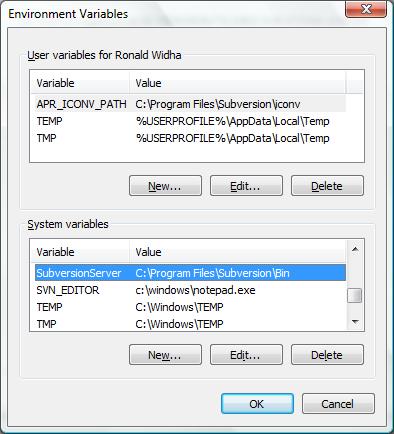
Creating the environment variables
From here on all you have to do is to create an environment variable pointing to the correct path. In windows vista, that's:
Control Panel > System > Advanced > Advanced > Environment Variables
You need to enclose the long file name in escaped-double-quotes.
Hi Grant,
That was what I first thought as well. Upon closer inspection svn_repos binpath argument expects the value to be enclosed in double quotes like so: "C:\DevSupport\Subversion\bin\svnserve.exe --service --root D:\Repository"
So when you have a long file name, you'd probably ended up with ""C:\some long file name\svnserve.exe" --service ...".
Which what you might guess, won't work.
There's no need to use environment variables. Inside binpath quotes, you must use " instead of ". Example: SC create some_service start= auto binpath= ""C:Program FilesSomeServicePathSomeService.exe" -option" DisplayName= "Some Service" For you, it's going to be sc create svn_repos binpath= ""C:Program FilesSubversionbinsvnserve.exe" --service --root "D:Subversion Repository"" displayname= "Subversion Repository" depend= Tcpip It's been a while since this post was created, but hope it'll help :)