
 ronwidha
Branch Management Pattern part 2 of 3: Development on branch / Stemming
Development on branch / stemming is a minor simplification to the Development on trunk technique.
As said before, in a small to medium web project, development typically happens in two different streams: new features and critical bug fixes. This differentiation is based on typical product owners' requirement of wanting to have the flexibility of deploying between these two streams independently: bug fixes needs to be able to get released / deployed anytime, as required without interfering with new features development.
Development on trunk also addresses this requirement, however often at the cost of working without CI build process when dealing with critical bug fix. Depending on the release frequency, it maybe costly to add a new CI projects every time a branch is made.
Stemming recognizes the two different streams of development.
The idea is :
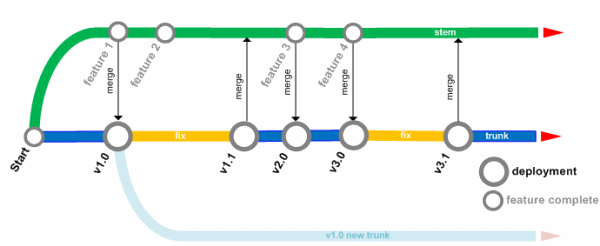
- having a Trunk and a Development Branch (or what I call a Stem).
- New features are done on the Stem.
- After a set of new features have been completely developed, Stem is merged into the Trunk and prepared for deployment.
- Only UAT and bug fixes are done in the trunk.
These bug fixes will need to be merged in into the Stem before the next version release. - While new features development continues to happen on the original Stem.
- When a version release is ready, a label is applied to it.
- Both branches (Trunk and Stem ) have their own Continuous Integration process.
Meant for the web
Stemming is suitable for small to medium size web applications where features are normally planned way ahead of time and bug fix deployment happens relatively more frequently than other types of applications.
Most of the time, the team are working on the new features on the stem. When enough features are present to form a release, the stem is merged onto trunk and goes through user acceptance test (UAT) and eventually deployment.
Bugs that are found on the trunk may be fixed on the trunk itself. The fix then is applied back to the stem.
In parallel to all this, the rest of the team could continue on working on new features on the stem.
As you can see here, the code version in trunk reflects the last version that was released. Hence, in a web project perspective, trunk reflects what's on production.
The advantages
By limiting to not grow more than 2 code branches (Trunk and Stem) complexities and risk from faulty merges are relatively low. The communication errors that often resulting to a faulty merge are reduced by the possible number of targets where developers need to work against.
Ironically however, Stemming demands bi-directional merging, which have to be done in high discipline. Having a single person to be the Build Manager is highly advisable.
Adding to that, Continuous Integration process also remains constant and unchanged. Set once and forget.
Lastly, just as Development on trunk pattern, Stemming also promotes code reuse.
The limitations
This hard limit on the number of allowed branches imposes a strong restriction on the business. Product owner will not be able to easily request for a feature to be included in a later/earlier version release. Product owner have to cautiously lined up what each future versions can do in a linear way.
Thus, even more so than Development on Trunk pattern, Stemming works best for a project with a linear timeline; where feature releases are well planned, decided before development started and critical bug fixes are frequently done.
Because of the hard limit, Stemming also does not work for products which require supports on multiple versions (for e.g. supporting bug fixes for v1.1 and 1.3 independently).
Observant reader might argue that great degree of flexibility can be achieved by taking the same concept of Stemming (to always work on a branch) but getting rid of the hard limitation to the number of allowed branches. This pattern is what's known as Feature Branch pattern (stay tune for this).
Multi-version support
The same points on Development on Trunk pattern applies to this pattern.
This technique scales to more complicated projects where it is required to support multiple version releases (for e.g. products that are deployed to clients, v1.0 and v2.0 service packs, additional features, etc). This can be done by creating another Trunk, and consequently another Stem.
The decision to create another trunk should not be taken lightly. Working with more than one trunk will hugely over complicate branch management.
It is advisable for this new trunk to not get merged with the origin trunk. Any branch management pattern that you find suitable can be used to manage this new trunk.
Updated [2009/10/19]: Tfs Branching Guide 2.0 had 3 derivatives of this pattern; basic, standard and advanced branch plan. The difference between all these patterns are the number of branches that they have. While Stemming only have 2 live branches; basic, standard and advanced have 3,4 and 5 consecutively. I find all the pattern mentioned in the guide to be highly unproductive. Upon quick glance, I feel that the problem that the branching pattern try to solve can be easily solve by labelling each releases/deployments.
Updated [2009/10/19]: Added labelling upon version release. Originally I didn't want to go down to this level of detail; interacting with source control. However, it seems that without mentioning this trivial point, readers might miss out on the fact that they can always go back ’˜into the past' and create a new trunk on a specific label.
free bets
free bet
free sports bet
free betting
free bet no deposit
free gambling
free bets no deposit
free sports betting
free online gambling
free bet offers
betting free
free sports bets
free betting tips
free bets uk
bets free
free bet offer
free betting offers
free bets online
best betting offers
betting bonus
bonus bet
betting bonuses
bonus betting
bet bonuses
bonus bets
best free bets
bookmakers free bets
betting tips
betting websites
betting website
soccer betting
betting advice
live betting
betting guide
bet tips
betting offers
betting offer
soccer bet
bet offers
bet offer
free bets uk
free bet uk
premier league betting
cricket betting
horse betting
horse racing betting
racing betting
horse race betting
sports gambling
bet bonus
betting bonus
bonus bet
betting bonuses
bonus betting
bookmaker bonus
bonus bets
football betting
football bet
bet football
betting football
best betting offers
best bets
best bet
best betting
best betting sites
best betting site
sportsbook promo code
best online sportsbook
sportsbook bonus
sports betting
sports bet
sport bet
sports bets
sport bets
bet sport
online betting
bet online
online sports betting
betting online
online betting sites
online betting guide
online bet
sports betting online
best online betting
online betting offers
no deposit free bet
free bets no deposit required
free sports betting
sports books
online betting guide
[...] Development on branch / Stemming pattern addresses this issue. [...]
[...] pattern is Stemming which suggest that there should only be 2 branches; a Stem and [...]