
 ronwidha
The best code formatter/syntax highlighter for WLW
There are more than a handful codeformatter/syntax highlighter plugin for the fantastic Windows Live Writer (if you're blogging without this, then you better stop reading this post and download it first). However, I only find one that is exceptionally good which is the creatively named Code Formatter for Windows Live Writer.
It has 3 different modes: as image, as formatted html, or using Alex Gorbatchev's Syntax Highlighter Javascript. I like the latter the most.
Here's how to set it up:
Step 1: Set up your blog
include Alex Gorbatchev's Syntax Highlighter Javascript on your blog template. For me, I'm using Wordpress, so I can simply add the reference by using this plugin: Syntax Highlighter and Code Prettifier Plugin for WordPress.
Step 2: Set up the WLW
With our blog out of the way, we now focus on WLW. Download Code Formatter for Windows Live Writer, extract and copy the files to the WLW plugin folder.
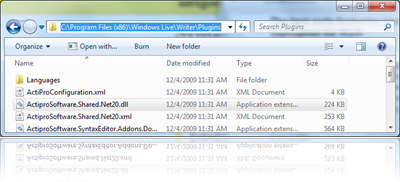
Step 3: Get rid of the options you won't use
Disable the ’˜source code as image' and ’˜source code formatter.
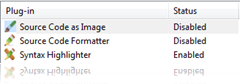
Step 4: Start using it
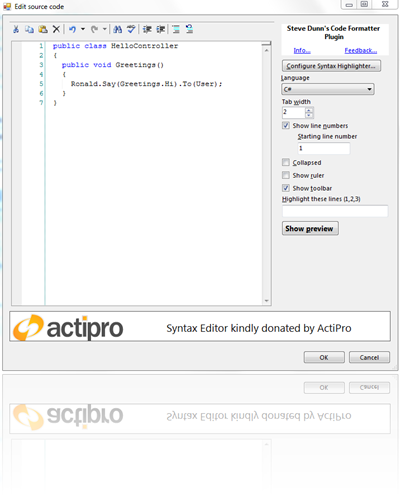
And here's the result! Voila!
public class HelloController
{
	public void Greetings()
	{
		Ronald.Say(Greetings.Hi).To(User);
	}
}
proxy sites
web proxy
proxy list
free proxy
hide my ip
hide ip
proxy online
unblock youtube
anonymous surfing
unblock websites
kproxy
youtube proxy
free proxy server
air proxy
anonymous proxy
free proxy list
proxies
proxy site
webproxy
proxy server list
online proxy
free web proxy
proxy web
proxy servers
proxy websites
proxy free
uk proxy
bypass proxy
unblock proxy
proxy youtube
proxy website
proxi
proxys
proxy browser
ip proxy
foxy proxy
ninja proxy xnxx
reverse proxy
socks proxy
proxy ip
google proxy
free proxy sites
proxy bypass
free proxies
free proxy server list
school proxy
proxy server free
proxy definition
china proxy
https proxy
free proxy servers list
free proxy servers
online proxy checker
google proxies
tor proxy
fresh proxies
fast proxy
unblocked proxy sites
php proxy
surf anonymously
proxy.com
video proxy
proxy surf
hidemyass proxy
proxy browsing