
 ronwidha
a simple example of the WebFormsMVP Cross Presenter Messaging
In my last post, I covered the basics of WebFormsMVP framework. On this post, I want to talk about a feature of the framework that I really really fall in love with: Cross Presenter Messaging.
The Problem: communications between controls
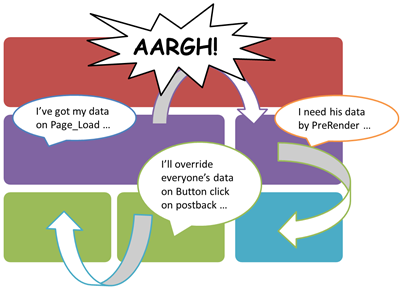
Because of the compositional nature of WebForm, we tend to build functionalities in web/custom controls. All are nice and well until some of these controls need to pass data between each other, then it gets complicated really fast.
The complexities come from the fact that we often rely on some piece of data fetched by some control at some point in time in the past to be used by another control at a different point in time. May not be too hard, but it's really not a nice problem to solve, and often leave us scratching our head ‘do we put this onPreInit, PageLoad, onDataBind or where??’.
The Solution: Message Bus
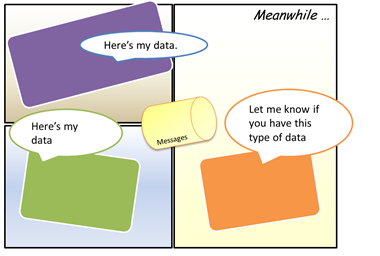
The Webforms MVP framework introduce a concept of Message Bus which allows each of the Presenters (thus Controls) to publish and subscribe messages.
You may ask ‘okay, you can publish and subscribe. What difference does it make between storing the message in the viewstate, query strings or even doing a direct set on to the property of a control. You'd still need to work out the order to which the message can be passed, right?’.
No. The beauty of the message bus is it coordinates the publishing of the messages quite efficiently. The algorithm is simple:
Anytime a message is published, the message will be sent to all its subscribers.
If a new subscriber just joined in, it will get all the previous messages.
Simple but very effective! By using the message bus we decouple each of the presenters and all communication will go through the message bus.
Example: Ultimate Fighting Controls
The example shows two controls sending messages between each other through the message bus. The essence of the examples are really just these two lines:
Messages.Subscribe<PunchMessage>(punch => View.Model.Status = GetStatus(punch));
This line shows that the Presenter subscribes to any messages of type ’˜PunchMessage' and execute a callback function for every message that fits the criteria.
Messages.Publish(new PunchMessage(e.Puncher));
This line is to publish a message with some parameters read from the button click eventargs.
Isn't that awesome?
Ronald - this is great! Thank you very much. I was hoping you could shed some light on how I could use the same approach - but in a winforms. What I'm developing now will be both a Web App & Desktop App - and being newer to MVP (specifically Supervising Controller) - using WebFormsMVP will "couple" me to a Web Form. How can I accomplish the same to appease both Win Form & Web Form UI's? At any rate - your blog has been a great help - thanks!
Hi Ajwaka, glad that I could help. Patterns like MVP often seem to look like it would be the perfect pattern to enable code re-use across "platform" (web/desktop/mobile/etc). However it can only go so far before we will hit a wall. Often this wall is caused by the fact that desktop and the web just simply behaves differently. However webform tries really hard to make the web feels like desktop. If we think about more philosophically, would you think apps for web and desktop should be the same. With the rise of ajax/html5/etc, perhaps. But still reusing presenters between winform and javascript is going to be quite hard. If I were you, I would invest the effort on Domain Driven Design and Service Orientated Arch. What you should aim to reuse are not the presenters but the rich domains. These domains should be exposed as message contracts through services. Keep in mind you will be doing alot of the code on each client - but in the hope that you could optimize the experience for each platform independently. If you really want reusability - take a look at Silverlight perhaps?
good points. I was thinking Silverlight - but haven't ventured there yet. Since the first goal of the project is to have it work as a web app - I should really focus on there - hence I should use WebFormsMVP - then worry about the desktop integration. "Make a working windmill first" Thanks for clearing out some clutter in my brain!
I really loved your diagrams, especially the one for The Problem. Thanks for your post.