
 ronwidha
Adding custom web.config entry into SharePoint 2010
So we've got our SharePoint feature, and it needed that extra web.config entry to get working, be it an endpoint binding information to an external wcf service, or custom appSettings values. What do we do?
Programmatically
We can always add the entry programmatically using SPWebConfigModification upon Feature Activation. Combine the two together, and you've got a custom web.config entry.
Provide a supplement
The problem is building config hierarchy programmatically isn't the most fun task one could have. A nicer way to do it is to use what Microsoft call as a supplemental .config File. Not the most search engine friendly term isn't it.
Basically, you specify the changes you want to make in the form of an xml like this:
<actions>
   <add path="configuration/SharePoint/SomeSection">
      <!-- stuff to add -->
      <SafeControl
         Assembly="System.Web, Version=1.0.5000.0, Culture=neutral, PublicKeyToken=b03f5f7f11d50a3a"
         Namespace="System.Web.UI.WebControls"
         TypeName="*"
         Safe="True"/>
   </add>
   <remove path="configuration/SharePoint/RuntimeFilter"/>
</actions>
Save the file to the 14 folder\CONFIG as webconfig.[name].xml. To do that:
First, create a SharePoint Mapped Folder on the Sharepoint Project:
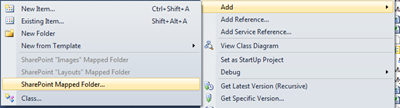
We need to deploy to CONFIG, so pick CONFIG.
Add the new xml file into the mapped folder and deploy the project as per normal.
Next, you can retroactively apply changes to an existing SiteCollection by running the following command on the command line on each front-end web server.
stsadm -o copyappbincontent
[...] you can use a supplement web.config file to add the end point into the main web.config, but I find putting it in the same folder as the svc [...]
what if I wanted to remove a specific section tag with a particular name property. Is that possible with the remove tag?
dont forget to add id with GUID for every "ADD" entry, that for forbidden duplicate entries
So, if I add a couple of keys using this additive web.config mechanism, can my event receiver code or custom aspx page in the layouts folder simply get at the desired key/value like I would in other .NET apps? using System.Configuration.ConfigurationManager String registrationCode = appSettings["REG_CODE"]; Or... since this is a web app: using System.Web.Configuration; String registrationCode = WebConfigurationManager.AppSettings("REG_CODE")
that's the idea