
 ronwidha
CRON job on Azure: Using Scheduled Task on a Web Role to replace Azure Worker Role for background job.
The Problem
For scalability or what not, we often feel the need to run scheduled tasks. In Azure, worker role is perfect for that. Get an infinite loop and sleep command going, and you get yourself a background worker.
The problem with that is, firstly, once you get serious and need some visibility to the previous runs, we're now responsible for creating the history log repository and all that ourselves.
The second problem is more obvious, cost! I don't want to run a worker role just as what essentially a CRON job.
The solution
Put the background job on the Web Role, have it exposed as a url for e.g. https://somesite/tick and have it triggered by a scheduled task/CRON job.
You could pay for a CRON service. But supposedly if you're reading this than you probably already have at least 1 Compute Role, and most likely a Web Role (instead of a worker role). If yes, then read on : I'm going to take you through how to create a simple CRON-like service on Azure.
Steps
1. Let's create our Background action endpoint i.e. https://somesite/tick
I use Asp.Net MVC2 so all I have to do is create a controller and have one single action like such:
public class TickController : Controller
{
   public ActionResult Index()
   {
       // do your background job here:
       // for e.g. check twitter
       // analysis
       // save analysis result into table storage
       return View();
   }
}
2. We don't want to manually trigger the background action so let's create a console app as a trigger.
Let's call this HttpTaskRunner.exe
internal class Program
{
   private static void Main(string[] args)
   {
       // get url that we want to hit from config
       // i.e. https://somesite/trigger/
       var taskConfigSection = (TaskConfigSection) ConfigurationManager.GetSection("TaskConfig");

       var taskUrl = taskConfigSection.Url;

       // create a webclient and issue an HTTP get to our url
       var httpRequest = new WebClient();

       var output = httpRequest.DownloadString(taskUrl);
   }
}
3. We need to deploy this to Azure, so let's include our HttpTaskRunner.exe along with its config into our Web Role project.
Don't forget to go to properties > Copy to Output Directory : Copy Always. This way the .exe will be packaged along for deployment.
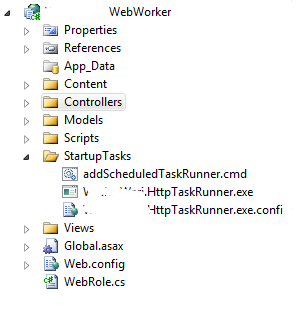
4. We will need to automate running the HttpTaskRunner.exe. We're going to need to set up a Scheduled Task on the web role using Azure StartupTask.
So let's create a batch script, let's call this addScheduledTaskRunner.cmd.
net start "task scheduler"
net user scheduler SecretP@ssw0rd /add
net localgroup Administrators scheduler /add
schtasks /create /SC MINUTE /MO 1 /TN WariCheckNewFeed /TR %~dp0Widha.Wari.HttpTaskRunner.exe /F /RU scheduler /RP SecretP@ssw0rd
notes:
- You only need the 3rd line if you need admin privellege to run the task
- schtasks.exe is a Windows executable available on the Windows OS family which allows us to create scheduled task etc. Above we're setting it up so that the runner is executed once every minute.
- %~dp0 is a special variable that will give us the application root\bin\any folder structure that you have underneath it.
- /F is a flag to Force update so that if for some reason the role is restarted but not re-imaged, the startup task will not thrown an error.
- A common gotcha in VS2010, it creates text file with utf-8 which will produce an invalid .cmd file. So let's just use a notepad and save it along side HttpTaskRunner.exe
5. Let's setup the Azure Startup Task that creates the Scheduled Task.
Open up the csdef file and the following:
<WebRole name="Widha.Wari.WebWorker">
    <Sites>
    <Site name="Web">
    ...
    <Startup>
        <Task commandLine="StartupTasks\addScheduledTaskRunner.cmd" executionContext="elevated" taskType="simple" />
    </Startup>
</WebRole>
Note:
- We need elevated permission to create scheduled tasks.
- If you need some debugging tips on startup tasks, head over to Steve Smarx's Windows Azure startup task tips tricks and gotchas
Voila! Cron-like background job running on Azure Web Role!
Why not just put the background task in the Startup Task?
background task would just fire off once - unless if you have a "cronjob server" as such. but at that point you might want to consider using worker role. You can't detect the health of a server running on a background task as easily as a worker role.
Took me a minute to understand what you were trying to do... basically you are causing a scheduled task to be created on the Azure machine to which the web role is being deployed to. That's brilliant. Thanks for the tip!
indeed. keep in mind that if you increase the instance count you'd have two scheduled tasks running in the background.
Yea, thought about that. Luckily the task I want to schedule is idempotent. The task I have calls a web service. One thing I do have to look into is how to change the Url that it calls. Meaning when I deploy to my "azure test service" it should hit the url https://mytestservice.com/controller/action and when I deploy to my "azure live service" it should hit https://myliveservice.com/controller/action. Basically I need to do something like a web.config transform but on the config file that my scheduled task looks at. Any ideas or experience with that? Thanks for your help!
|- A rather annoying side-effect of creating the scheduled task via the SYSTEM account (as most installations in Azure are) is that you cannot execute the task manually by right-clicking the task from a remote desktop session. The only way I could do it was to export and re-import the task again, as a logged in user.
When you mention: “Don't forget to go to properties > Copy to Output Directory : Copy Always. This way the .exe will be packaged along for deployment.” I take it this option is available only in VS. I am not using VS at all. I am using WebMatrix and using CSPACK from commandshell to package the files. Is there a way for me to copy the executables without using VS? Is there any other build command that can “copy always”?